WhatsApp Focus Schedules feature: If you are frequently disturbed by WhatsApp notifications while working on important tasks, WhatsApp’s upcoming ‘Focus Schedules’ feature is for you. This feature will help you stay focused while you work. How? Let us explain.

WhatsApp has billions of users worldwide, and the social media platform is rapidly updating itself to provide a better user experience. A new feature is now in the works that will help users maintain their focus while attending to important tasks. Reports indicate that WhatsApp is developing a feature for WhatsApp Plus that will allow users to control exactly when they receive notifications for specific chat lists. Users will be able to automatically mute or hide certain chats outside of designated times, preventing distractions while they work.
This will provide premium subscribers with a smart tool to manage their focus without the need to manually mute and unmute conversations repeatedly. The feature is currently under development and is not yet available for beta testing. Let’s take a look at the details regarding how this new feature will work…
WhatsApp is developing a ‘Focus Schedule’ for Plus subscribers
WABetaInfo, a website that closely tracks new WhatsApp developments, reported that the upcoming feature relates to chat management. Named ‘Focus Schedule,’ this feature will allow subscribers to determine when they wish to receive notifications for chats included in specific lists. Information about this feature emerged from the WhatsApp Beta for Android update version 2.26.39.9, available on the Google Play Store.
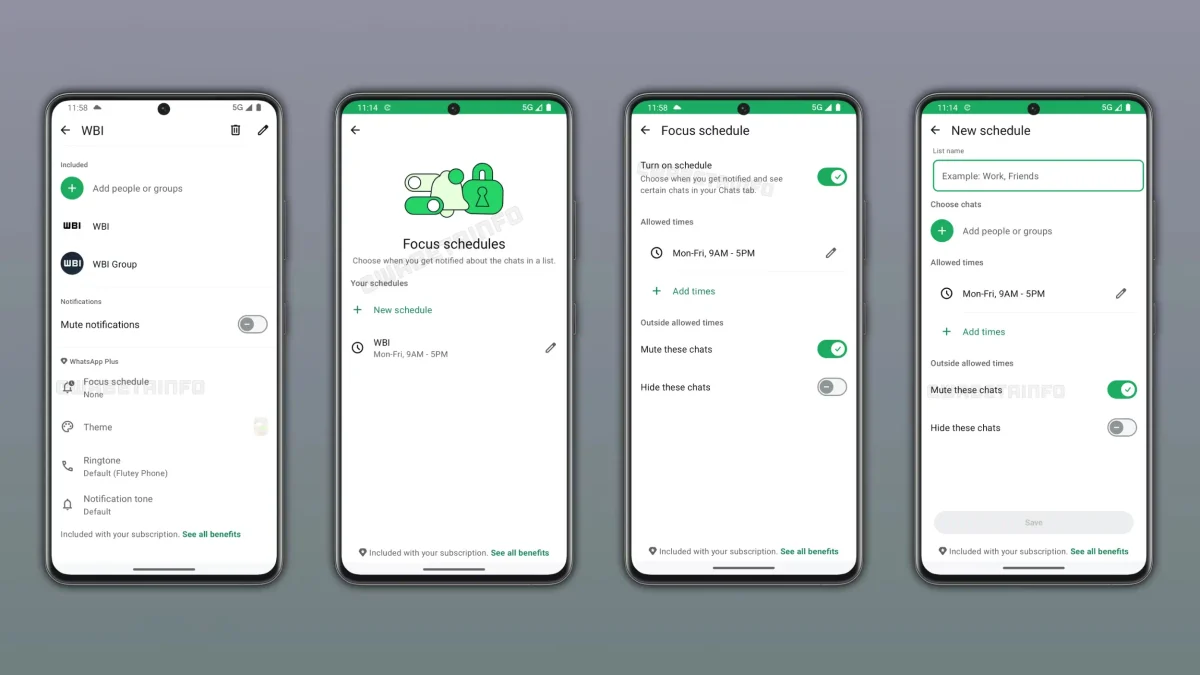
WhatsApp is testing the ‘Focus Schedule’ feature, which enables Plus subscribers to set notification time windows for their chat lists. Outside of these scheduled times, WhatsApp can automatically mute or hide chats without requiring any manual intervention from the user.
How to set up a ‘Focus Schedule’ for chat lists
Users can create a ‘Focus Schedule’ directly within the list settings. Here, they can tap on “New schedule” to create a new one. WhatsApp prompts for a list name and allows users to add specific chats or groups to it. Users can also set a specific timeframe; this means they can decide when notifications for that list should be active. Users can even add multiple time windows to a single list.
What happens during and outside the scheduled time
During the scheduled time, users can receive notifications and participate in these conversations without interruption. Outside the scheduled time, WhatsApp applies the rules configured by the user. Users can choose to automatically mute chats; this silences notifications without hiding the conversations from the chat list. Users also have the option to hide these conversations from the chat list entirely. These features are optional, so users can decide which ones to enable.
How ‘Focus Schedules’ work with multiple lists
Premium subscribers can create different schedules for different lists. For example, a user might have a ‘Work’ list scheduled for Monday through Friday, 9 AM to 5 PM, and a ‘Friends’ list scheduled for evenings and weekends. When work hours end, WhatsApp automatically mutes the ‘Work’ list. When the weekend begins, the ‘Friends’ list becomes active again. Users can manage their schedules via the list settings.
Why ‘Focus Schedules’ in WhatsApp Plus?
WhatsApp Plus is a premium plan that offers greater personalization options compared to the standard app. Its initial features included exclusive stickers and ringtones, custom app icons, app themes, and the ability to pin more chats. With the ‘Focus Schedule’ feature, WhatsApp aims to add another layer of personalization to this premium plan. Instead of manually muting and unmuting multiple chats repeatedly, subscribers will be able to set a schedule for the app to perform these actions automatically. This will make it easier for users to manage multiple conversations.
Work on the ‘Focus Schedule’ feature is ongoing.
The ‘Focus Schedule’ feature is currently in the development phase. Since it is still being developed, it is not yet available even to beta testers. WhatsApp plans to roll out this feature to all users in a future update. As of now, there has been no announcement regarding its public release, so users will have to wait for it.


